 Phone Cleaner
Clean up
your phone.
Duplicates, blurry shots, giant videos and old screenshots — found for you, cleared in a tap. Your photos never leave the phone.


Everything that fills
your phone. Gone.
Eight tools in one calm app. Nothing is deleted until you say so.
Duplicates & clutter
Similar shots, screenshots and blurry pictures, grouped for one tap.
Swipe to sort
Flick through the library — left to Trash, right to Keep.
Compress videos
Same moments, a fraction of the size. Keep originals if you like.
Private vault
Hide pictures behind a PIN or Face ID, encrypted on device.
Clean up the inbox
Gmail senders, most emails first. Unsubscribe and trash in bulk.
Merge contacts
Duplicate cards combined into one — with a snapshot first.
Clean your speaker
Tones that push water and dust out of the grille.
Block ads in Safari
Ads, trackers and cookie pop-ups, gone from every page.



Keep the best.
Lose the rest.
Bursts, near-identical shots, screenshots and blurry photos are grouped by moment. The best one is kept for you — the rest go in one tap.
- Best shot picked automatically
- Screenshots, blurry and weird shots
- Sorted by AI: people, pets, nature

Sort a month
in a minute.
The whole library, one photo at a time. Swipe left to Trash, right to Keep. Nothing is removed until you review it.
- Month by month, with progress saved
- Live Photos play as you hold
- Review everything before it goes
Same videos.
A fraction of the space.
Choose a quality level and let it run — on iOS 26 or later, compression keeps going after you leave the app.
- Three levels, from barely-there to tiny
- Progress on the Lock Screen (iOS 26 or later)
- Keep the originals if you like

Clean up
your inbox.
Connect Gmail and see who fills it — most emails first, or, with Large files, the senders whose big attachments take the most space. Unsubscribe and trash in bulk, and spot emails that may be fake.
- Senders, most emails first
- One-tap unsubscribe
- Flags emails that may be fake

See the space
you saved.
Every clean ends with Dust: the pictures you removed break into grains and settle as the number itself.


Your photos never
leave your iPhone.
On-device scanning
Finding duplicates, sorting with AI and measuring sizes all run on the phone's own chip.
An encrypted vault
Private photos are sealed with AES-256 behind a PIN or Face ID.
No account. No tracking.
No sign-up, no tracking, no ads — only anonymous usage counts. Your library is yours.

Made for iPhone,
iPhone Duo and iPad.
One app that fits the screen it's on. Everything still runs on the device, in 20 languages.
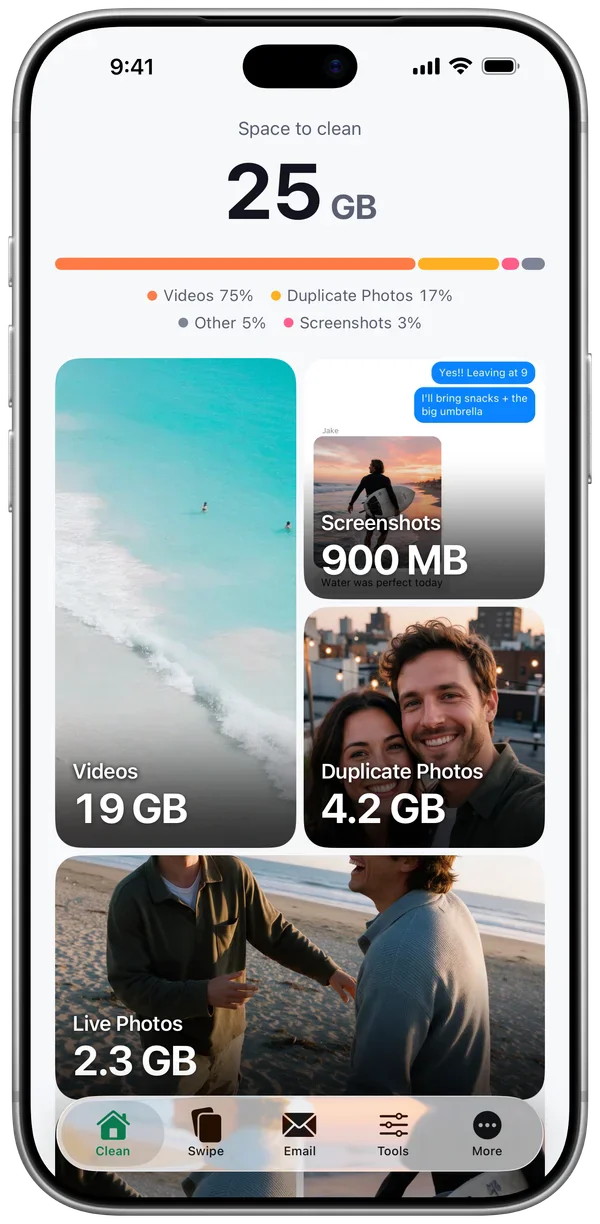
iPhone
All eight tools, on every model with iOS 18 or later.
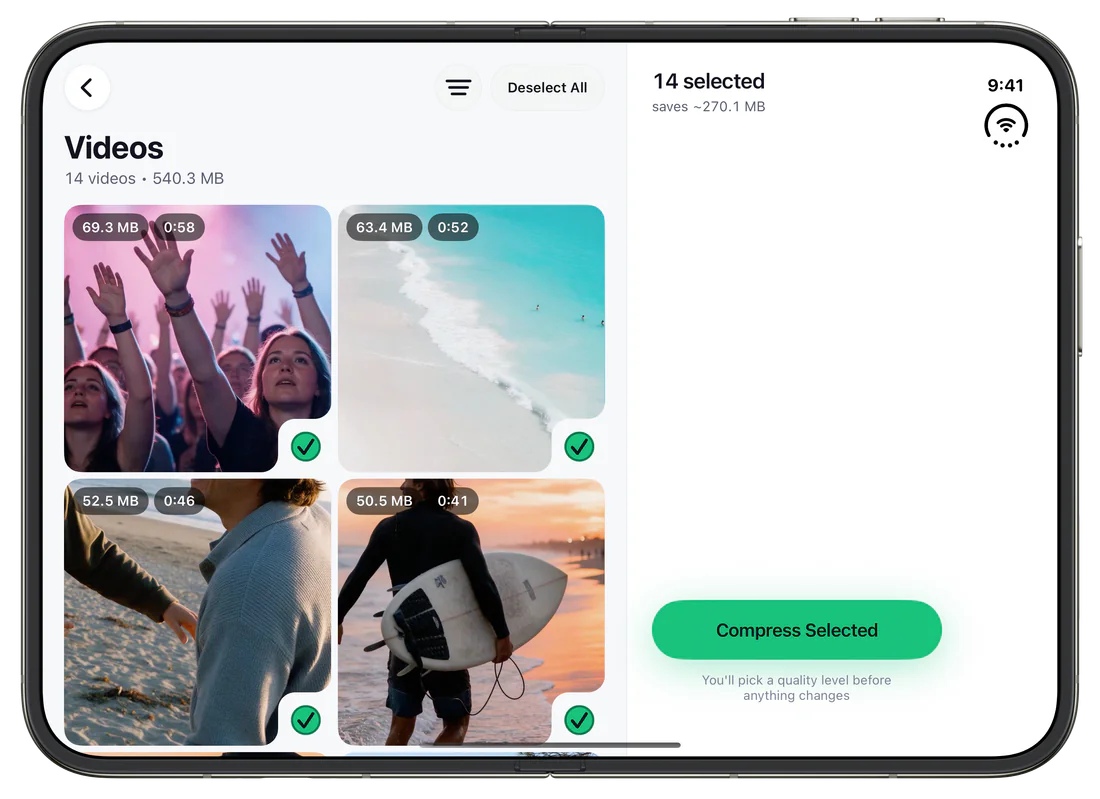
iPhone Duo
Closed or open, it fits: a vertical tab bar, grids that follow the fold, and the selection beside the grid on the open screen.
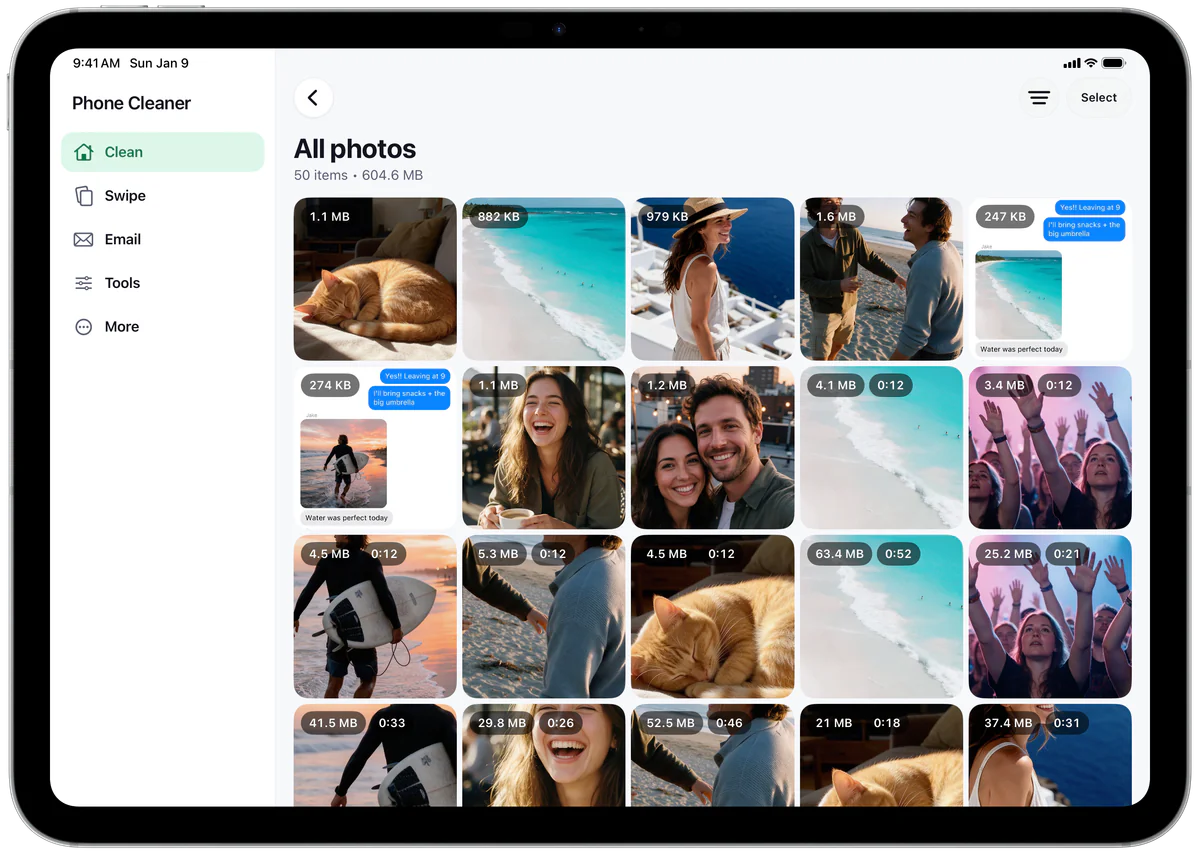
iPad
A sidebar for every tool, with your photos, videos and mail beside it.


Three taps to a
lighter phone.
- 1
Scan
Phone Cleaner reads the library on the device and sizes up everything that can go.
- 2
Review
Groups, sizes and the best shots are laid out. You decide what stays.
- 3
Free up
One tap. Removed items wait in Recently Deleted for 30 days, just in case.
Looking for an iPhone
cache cleaner?
What you can clear yourself
Safari's cache, in Settings, and many apps' caches, from their own settings. Reinstalling an app clears it too, but deletes its saved data — the guide shows the safe way.
What no app can clear
iOS seals each app's cache away from every other app, so no cleaner — ours included — can reach it, whatever its name says.
What Phone Cleaner frees
The space you control: duplicate photos, screenshots and big videos, found on the device and cleared when you say so.
Try it free.
Start with a free trial and clean up to 2 GB a day. Then choose the plan that suits you — right in the app.
Questions,
answered.
Something else? Write to us — we answer every message.
Does anything get uploaded?
Not your photos, videos, contacts or emails — scanning, sorting, compressing and the vault all run on your iPhone, and there is no account. What the app does send — anonymous usage counts, your subscription status to RevenueCat and Superwall, and your Gmail requests to Google if you connect it — is listed in full in the Privacy Policy.
Is deleting permanent?
Not straight away. Everything you remove goes to Recently Deleted in Photos, where it stays for 30 days.
Will compressing videos lower the quality?
You choose the level. The gentlest one is hard to tell apart from the original, and you can keep the originals if you like.
Which email accounts work?
Gmail, through Google's own sign-in. Messages are read on the device, never by us.
What does it cost?
Start with a free trial. After that, plans are shown in the app, and you can cancel any time in Settings.
Which devices does it work on?
iPhone with iOS 18 or later, iPhone Duo, and iPad with iPadOS 18 or later. On iPhone Duo the app uses a vertical tab bar, and on iPad a sidebar. Everything runs on the device either way.